Performance
Median of 3 runs, measured 2026-10-15 on an Apple M2 Pro (16 GB, macOS 26.6) over a home connection to github.com, gion v0.1.0-dev vs git 2.54. Cold means an empty gion cache; warm reuses it. Refs are never cached, so every gion run still makes at least one round trip. Each git baseline is the fastest git command that gets the same answer.
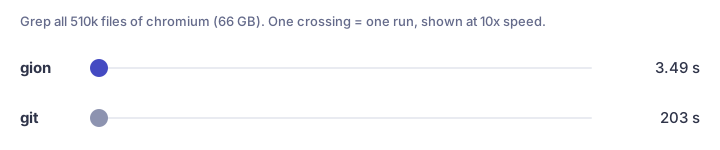
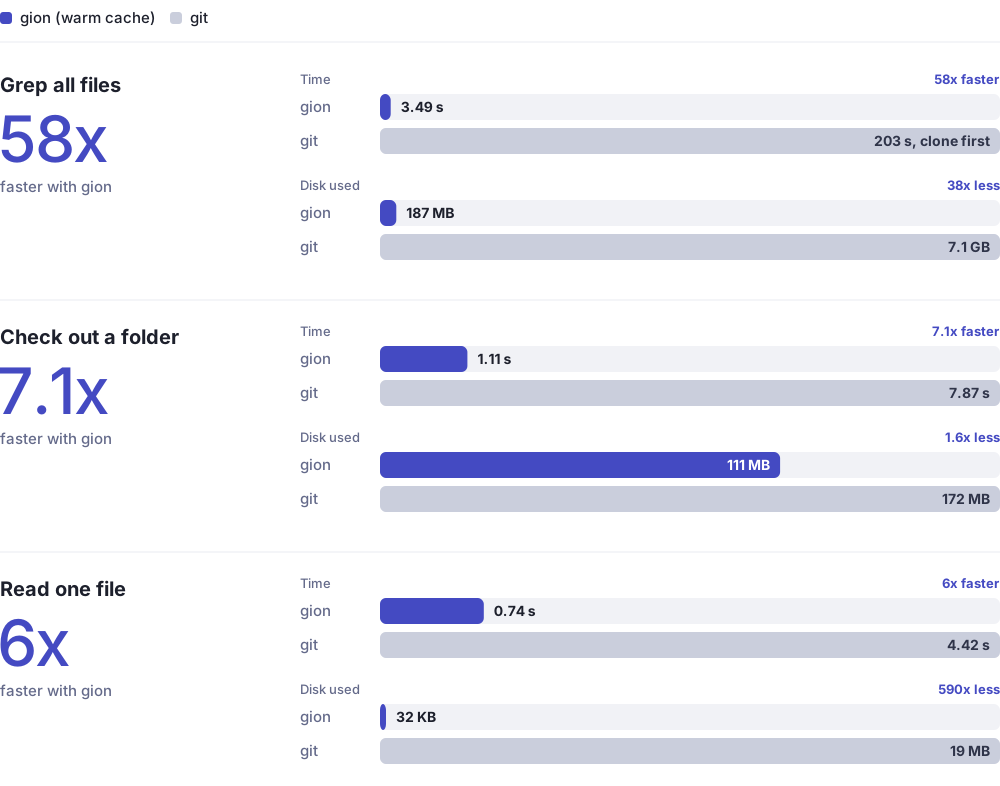
chromium (66 GB, 510k files), gion with a warm cache. Bars are scaled within each comparison. Disk numbers are single runs from 2026-10-20; see Disk.
| Task | gion, cold | gion, warm | git |
|---|---|---|---|
Resolve HEAD (chromium) |
0.69 s | (not cached) | 0.93 s: ls-remote |
| Read one file 3 dirs deep (chromium, 66 GB repo) | 2.68 s | 0.74 s | 4.42 s: clone --depth 1 --filter=blob:none + show |
| Find a path among all 510k files (chromium) | 19.60 s | 1.10 s | 4.27 s: clone --depth 1 --filter=blob:none + ls-tree |
| Grep all 510k files (chromium, via code search) | 19.63 s | 3.49 s | 203 s: clone --depth 1 + git grep (single run, 2026-10-20) |
| Grep all 3.5k files (baz, local scan) | 4.68 s | 0.81 s | 2.36 s: clone --depth 1 + git grep |
Clone one directory (baz demos/) |
1.27 s | 0.71 s | 2.69 s: clone --depth 1 --filter=blob:none --sparse |
| Clone the whole repo (baz, 3.5k files) | 4.73 s | 1.50 s | 2.20 s: clone --depth 1 |
History on chromium, single runs on 2026-10-16: log -n 20 1.3 s, log --path base/strings/string_util.h -n 5 3.1 s, blame of that file 7.8 s. With git, each needs a full-history clone first.
Commits push only the new objects: a one-file commit on baz sent 3–4 objects and took 1.4–2.9 s end to end. A clean rebase of a branch 10 commits behind took 2.5 s.
Disk
Single runs on chromium at HEAD, 2026-10-20, same machine, gion built from main vs git 2.54. gion starts from an empty cache; its number is the cache plus the workspace. Git's is the clone directory.
| Task | git | gion | git command |
|---|---|---|---|
| Read one file | 19 MB, 5 s | 32 KB (590x less), 3 s | clone --depth 1 --filter=blob:none --no-checkout + show |
Check out docs/ |
172 MB, 10 s | 111 MB (1.6x less), 6 s | clone --depth 1 --filter=blob:none --sparse + sparse-checkout set docs |
| Grep all 510k files | 7.1 GB, 203 s | 187 MB (38x less), 22 s | clone --depth 1 (180 s) + git grep (23 s) |
Half of the docs/ workspace is the .git gion keeps in step for pre-commit and other git-based tools; clone --no-git skips it. A full-history clone of chromium is 64.5 GB (GitHub's reported repo size).
Where git is faster
A cold full clone, and the first path index of a huge repo. The network isn't the bottleneck: gion stores every object as its own file (chromium's 45k trees take 181 MB as loose objects versus 18 MB in git's pack) and fetches a clone's files in sequential batches. Single-request clones, keeping received packs as they are, and parallel fetches are planned.
Reproduce
bench/bench.sh # 3 runs per case; bench/bench.sh 5 for 5
Numbers depend heavily on your network and on GitHub's load at the time.