Workspaces
A workspace is a directory with the files you chose at one commit, plus .gion/state.json. There is no history, and the remote branch is the only source of truth. A small .git lets git-based tools work (below).
gion clone baz-scm/baz ./baz --path services/api --path libs/auth
cd baz
$EDITOR services/api/handler.py
gion status
gion diff
gion commit -m "fix handler" --branch my-fix
What a sparse clone contains
- Every file under each
--path(a directory or a single file). Without--pathyou get the whole repo. -
The files directly inside each parent directory of those paths, the root included. That's where tools look for config, so
.gitignore,pyproject.toml,package.json,Cargo.toml,go.mod,conftest.pyand lint configs are there without naming them. -
The local dependencies of those paths (see below).
Edits to those parent-directory files are committed. New files you create next to them (scratch notes, logs) are not, unless you gion add them.
Local dependencies
clone --path and add read the manifests under the paths you ask for and follow what they point at elsewhere in the repo, until no new paths turn up. Those paths join the workspace, and gion says why:
$ gion clone baz-scm/baz ./bff --path bff
cloned baz-scm/baz@3bb443190f80 into bff: 822 files, 5.7 MiB (bff) in 2.1s
+ shared/fixer  (bff/package.json: "@baz/shared-fixer": "file:../shared/fixer")
| Ecosystem | What gion follows |
|---|---|
| npm, pnpm, yarn, bun | file:, link: and portal: dependencies; dependencies on packages of the workspace (workspaces in package.json, or pnpm-workspace.yaml), whether written workspace:* or as a version |
| Cargo | path dependencies (and [patch] / [replace] paths); every member of the crate's [workspace], since cargo needs them all; workspace = true dependencies through [workspace.dependencies] |
| Go | local replace => ./… directives; every use of the go.work above the module |
| Python (uv) | [tool.uv.sources] paths; every member of the uv workspace the project belongs to |
| Maven | <modules>; the parent POM (<relativePath>, default ../pom.xml); dependencies on other modules of the same reactor |
| Terraform | local module source = "../…" |
| Helm | repository: file://… chart dependencies |
| TypeScript | relative extends in tsconfig*.json (just that file) and project references |
Root lockfiles and workspace roots sit in a parent directory, so they come along anyway. Manifests under node_modules, vendor, testdata, test_data and fixtures directories are skipped.
If the dependencies together come to more than 5 GB, gion lists them instead of adding them, with the gion add command to take the ones you need. It measures with GitHub's API; on other hosts there's no cap. --no-deps on clone or add turns the whole thing off.
Gradle isn't followed. Gradle builds are scripts (settings.gradle(.kts), build.gradle(.kts)), so paths can be computed at build time and reading them as text would miss or invent dependencies. For a Gradle project, gion add the included builds and projects yourself; settings.gradle(.kts) at the root comes with every sparse clone.
Widening
gion add libs/shared          # fetch it at the workspace's commit and track it
gion add services/new-thing   # doesn't exist yet: it just joins the workspace
add never overwrites a file already on disk that differs from the repo; it lists those and changes nothing.
Status, diff and .gitignore
gion status lists added, modified and deleted files inside the workspace's paths. Files outside them are ignored, so a sparse workspace never reports the rest of the repo as deleted. Untracked files matched by .gitignore (including nested ones and your global excludes file) are skipped; tracked files are always checked, as in git.
gion diff [<path>...] shows your edits as a unified diff.
Committing
gion commit -m "msg" --branch my-fix   # first commit: create the branch
gion commit -m "more"                  # later commits update it
gion commit -m "hotfix" --to main      # push onto another existing branch
The first commit creates a branch (gion/<timestamp> if you don't name one). Pushes are compare-and-swap: if someone pushed to the branch in the meantime and changed other files, gion builds on top of their commit and writes their files to disk too; if they changed a file you edited, it stops and lists it. See Branches & rebase.
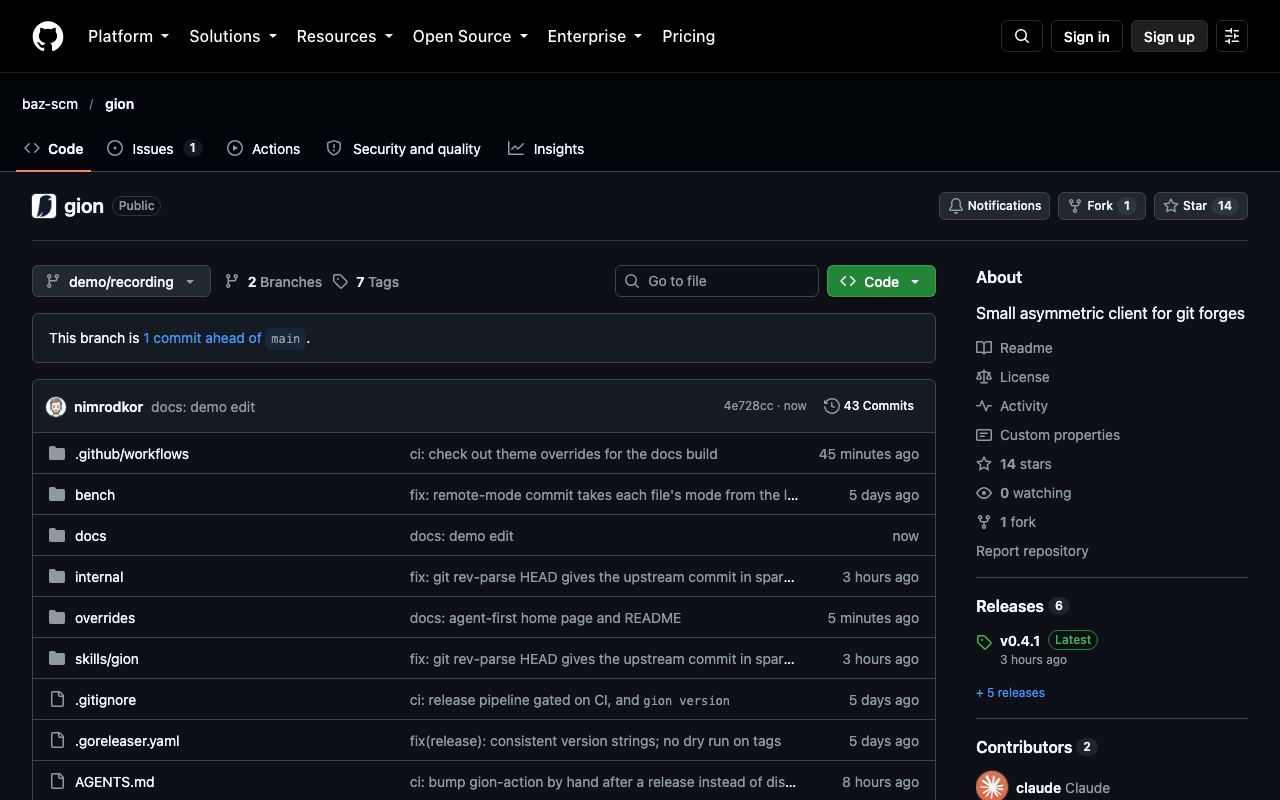
The pushed branch on GitHub, one commit ahead of main:
Identity comes from git's usual variables (GIT_AUTHOR_NAME, GIT_AUTHOR_EMAIL, GIT_COMMITTER_*, *_DATE) or user.name / user.email in ~/.gitconfig.
Keeping up with upstream
gion sync brings unedited files up to date with the branch. Files you've edited are kept; if upstream changed them too, nothing is written and the conflicting paths are listed. To replay your commits onto a newer base, use gion rebase.
pre-commit and other git-based tools
Tools like pre-commit, git diff and git ls-files need a .git, so every workspace has one, which gion keeps in step on add, sync, switch, commit and rebase (gion clone --no-git leaves it out):
gion clone baz-scm/baz ./baz --path services/api
cd baz
pre-commit install                  # or husky / lefthook, as the repo sets up
$EDITOR services/api/handler.py
gion commit -m "fix handler" --branch my-fix   # runs the hooks, then pushes
pre-commit run --all-files          # check every workspace file, any time
That .git is a local snapshot, not a clone, with no history, on a branch named after the one you push to. HEAD is the upstream commit, so git rev-parse HEAD gives the real commit id, which is what to use for naming build artifacts (sha-$(git rev-parse --short=7 HEAD)). When the workspace holds the whole repo, HEAD is that commit itself, as in a depth-1 clone. In a sparse workspace git reads a local commit in its place (a replace ref) whose tree holds exactly the workspace's files: the rest of the repo is simply absent, so git status stays quiet about it. git rev-parse GION_HEAD also gives the upstream commit, even with replace refs turned off. A local git commit goes nowhere; push with gion commit.
gion commit runs the pre-commit and commit-msg hooks (from .git/hooks, or core.hooksPath as husky sets it) the way git commit -a does: every change is staged first, so hooks that check staged files see all of them. If a hook fails, nothing is pushed; hooks that fix files (formatters) leave the fixes on disk, so commit again. --no-verify skips them.
Running tests
A workspace runs whatever the files on disk allow. Add the test directories and the code they import with gion add; if that's most of the repo, push the branch and let CI run them.